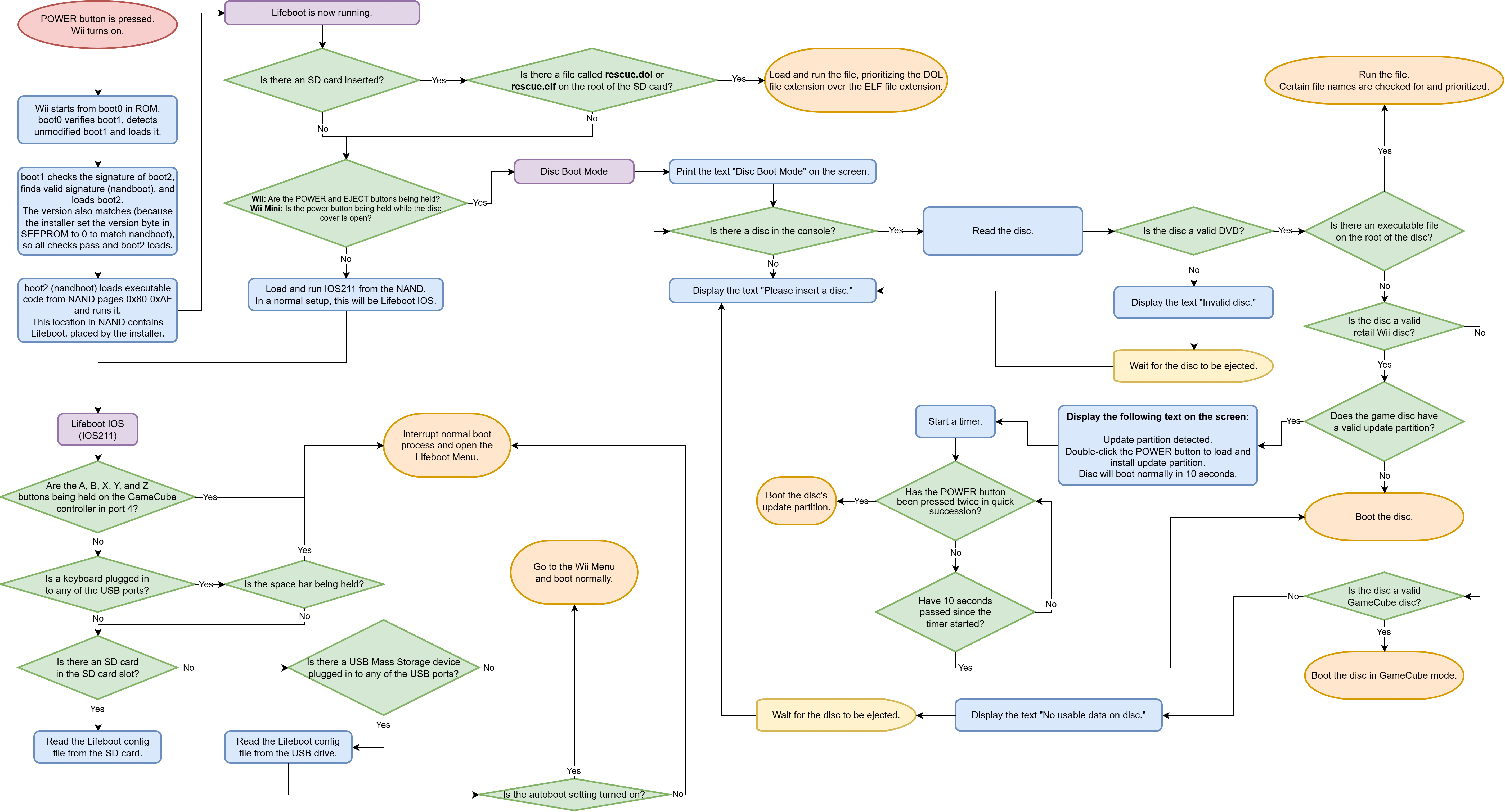
Lifeboot would provide amazing BootMii-as-boot2-level brick protection for all Wiis, including the Wii Mini. It works by using nandboot, which has a valid signature that boot1 will accept.
When you open the installer from the Homebrew Channel, it would work like this:
This is what gets loaded by nandboot. It's mostly a workaround for not being able to use a custom boot2. It uses MINI and has very basic code. All it does is boot into Lifeboot IOS. However, if it finds a file called rescue.dol or rescue.elf on the root of an inserted SD card, it will immediately boot that file instead of Lifeboot IOS. This is used in the rare case that Lifeboot IOS gets corrupted.
Lifeboot IOS is much more likely to get corrupted than the boot program because the boot program is designed to be almost never updated. However, Lifeboot IOS could receive updates, and it's also installed as IOS211, which can be easily overwritten by the user.
If the user is using a Wii Mini (or doesn't have access to an SD card), they can use Disc Boot Mode to fix a broken IOS211.
If you hold down the POWER and EJECT buttons while turning on your Wii, the Lifeboot boot program will enter Disc Boot Mode. In this state, you can boot any Wii or GameCube disc, and if your drive is compatible, you can also load a DOL or ELF file from a burned DVD.
On the Wii Mini, you would instead hold down the POWER button while the disc tray is open.
Click here to see a flowchart of the Wii's boot process with Lifeboot installed.
This is similar to BootMii. When it loads, it looks for a config file on the SD card or USB drive, which tells it what to do next. By default, the autoboot setting is enabled, causing it to simply load the Wii Menu normally. If the autoboot setting is disabled, the Lifeboot Menu will open whenever the console is turned on. If there is no SD card or USB drive, it will just open the Wii Menu.
Holding down the space bar on a USB keyboard or holding the A, B, X, Y, and Z buttons on a GameCube controller in port 4 will force Lifeboot IOS to ignore the autoboot setting and open the Lifeboot Menu.
There are 2 ways to access this menu:
The Lifeboot Menu would be navigated using the console's POWER and RESET buttons. On a Wii Mini, there's no RESET button, so you would instead hold the POWER button for a half-second to confirm your menu selection.
You would also be able to navigate it using a USB keyboard or GameCube controller.
The Useful Apps option in the menu opens a sub-menu with a list of homebrew apps that can be used to recover from a brick. A few important apps are stored in a special location in the NAND, in case the SD card or USB drive won't work. Loading is attempted from SD, then USB, then NAND (if it's saved to the NAND).
This menu is mostly for convenience when you already have a homebrew app on your storage device, allowing you to skip copying the boot.dol file to the root directory.
| Homebrew App | Stored in NAND? |
|---|---|
| HackMii Installer | No |
| YAWM ModMii Edition | Yes |
| SysCheck ModMii Edition | No |
| Priiloader Installer | No |
| Any Region Changer ME | Yes |
| WiiXplorer-SS | No |
| KoreanKii | No |
| nanddumper@IOS | No |
| Dump Mii NAND | No |
| SEEPROM Viewer | Yes |
| csm-installer | No |
| Wii Mod Lite | No |
Mainly used for restoring NAND backups when BootMii is unavailable. Uses a GameCube controller or USB keyboard for Konami code input.
There's a major roadblock preventing this idea from being created and widely used: nandboot is copyrighted content, and the homebrew community won't want to distribute it. Even if it was an independent project, the homebrew community wouldn't recommend using it.
I don't know what the specific DMCA laws are, and I don't know how nandboot could be legally distributed. It would need to use some kind of indirect distribution or something that exploits a loophole. I've heard that console hacking is perfectly legal for repairs (it's only legally grey for homebrew), so maybe that could be used to our advantage?
However, if we could get around the legal issues, this idea would provide very good brick protection for all Wiis, including Wii Family Edition and Wii Mini.